AutoMod
Featured Links
Description
AutoMod is a computer-based modeling and simulation tool. Taking about AutoMod, one could say that a realistic 3D simulation is worth a thousand words. AutoMod has been developed to fulfill the needs of the first-time "simulationist" as well as those of the expert analyst. In other words, this tool combines ease-of-use and modeling power.
Realistic and Precise 2D and 3D Graphics
AutoMod includes a CAD editor that supports accurate 2D and 3D modeling, with a precision of 1/100th of mm if necessary. The simulation can also be detailed down to 1/100th of a second.
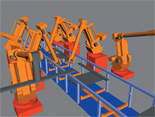
The 3D representation is concurrent with the creation of new objects, such as section of conveyors or racks in a warehouse. Shapes can be imported from a special library or retrieved from Brooks Automation's web site.
Drawings can also be imported from your CAD system, such as AutoCAD or Pro Engineer.
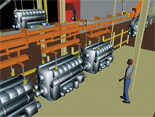
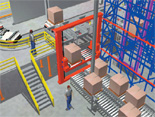
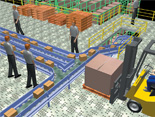
Power to model the logic of the simplest as well as the most complex systems
After the objects and graphics have been created, additional logic can be added to detail the behavior of these entities through as spread sheet interface or using the AutoMod 4th generation language (4GL).
The use of the integrated spreadsheet interface allows novice and experienced users to build their models quickly without writing a single line of code.
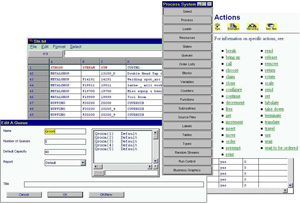
Within a few hours only, one can build and simulate an industrial system, including 3D graphics, production, storage and material handling equipment.
If modeling is not complex, the modeling in AutoMod will not be complex either. When more details are required to accurately represent the behavior of objects or special policies, the AutoMod language offers another level of flexibility, which in turn can be supported by C and C++ routines built into custom libraries and linked with your models.
Take control over reports and analysis
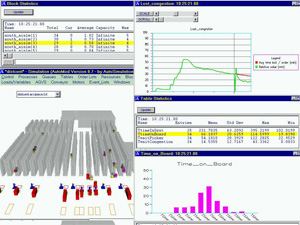
While the simulation is running, the user can control the 3D animation, change the point of view or select, check values and edit objects directly on the screen. Performance can be displayed using tables or graphics while the model is running or after the simulation is completed. Standard and custom statistics and sequence information are gathered and saved in text files for easy edition and importation into other analysis or management applications.